Free for your baby shower
Every baby shower photo, in a single album
A baby shower is short, informal and photographed by everyone at once. Without a shared gallery the parents-to-be end up with three photos out of two hundred, sent weeks later and compressed beyond use.

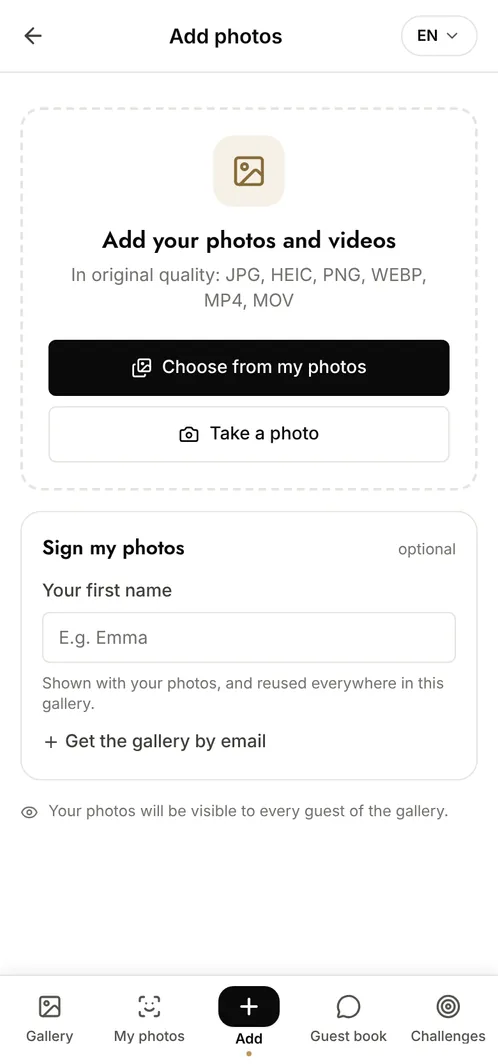
How do you collect the photos from a baby shower?
Put a QR code on the table next to the cake and let every guest scan it with their phone camera. They add what they took during the games, the gifts and the group shots, and they can browse everything the others uploaded straight away. There is no app to install and no account to create, and every photo keeps its original resolution, so the parents can print the ones they want rather than salvaging a compressed chat thread.
The moments that make the album
The decorated table
The cake, the balloons, the place settings before anyone arrives: usually shot by the host alone, and usually lost.
The games and the reactions
The guessing games, the laughter, the faces around the table. Guests catch these far better than any single camera can.
Opening the gifts
The parents-to-be discovering each present, and the reactions around them. The photos they will actually want afterwards.
Photo challenge ideas
Your guess for the baby, in a photo
Each guest stages their prediction and the parents pick the funniest at the end.
A photo with the parents-to-be
Everyone takes their turn, so the album covers the whole guest list.
The most beautiful detail
Guests hunt for the decoration detail nobody else noticed.
Which plan for your baby shower?
A baby shower with a dozen guests fits the free plan comfortably: 100 photos, 10 contributors, gallery online for 15 days. For a larger gathering, or to keep the album well past the birth, the Event plan at €69 (one-off payment) lifts every limit and keeps everything for 6 months.
Free
€0
- 100 photos, 10 contributors
- Gallery online for 15 days
- For a big crowd
Event
€69one-off
- Unlimited photos and contributors
- Selfie search
- Challenges and guestbook
- Gallery online for 6 months
Frequently asked questions
Can we set the gallery up in advance?
Yes. Create the event whenever you like, print the QR code beforehand and photos only start arriving on the day. Setup takes about two minutes.
Can the parents-to-be download everything at once?
Yes. The whole gallery downloads as a single archive at original quality, so nothing has to be saved photo by photo from a chat.
Is the gallery private?
Yes. Only people with the QR code or the private link can open it. Nothing is public, nothing is indexed by search engines, and you can moderate uploads if you prefer to approve them.
Can guests add videos as well?
Yes. Videos upload exactly like photos and sit in the same gallery, keeping their original quality rather than being compressed.
Also worth reading


Guides:QR codes for events: the complete guideShared Google Photos vs a dedicated event galleryCreate a shared photo gallery for your event
All event types