Free for your communion
The communion, seen through every guest's phone
The ceremony, the family portraits, the meal that stretches into the afternoon: three moments, thirty phones, and photos that normally never make it back to the parents. One shared gallery changes that on the day itself.

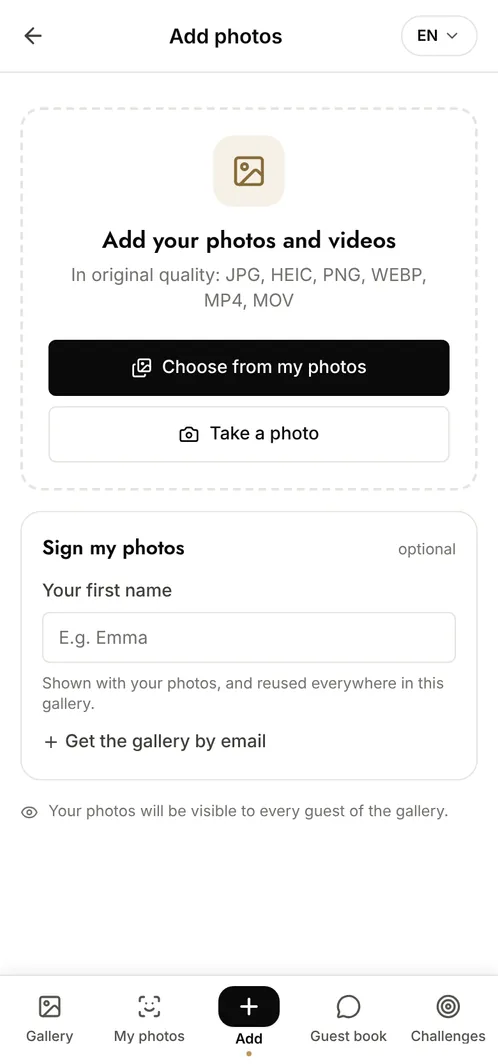
How do you collect communion photos from every guest?
Open a shared gallery and hand out its QR code, printed on the table cards or displayed at the entrance. Each guest scans it, adds the photos they took during the ceremony and the meal, and can browse everything the others uploaded. Nothing to install, no account to create, and the files keep their original resolution, so the photo the parents want to frame is still printable months later.
The moments that make the album
The ceremony
The entrance, the candle, the reading: the family sits in different pews and each phone captures an angle the others could not get.
The portraits outside
The photos taken on the steps, with the godparents and the grandparents, are the ones that end up on the mantelpiece.
The meal
The cake, the speeches, the cousins at the children's table: the informal half of the day, and the half nobody thinks to photograph on purpose.
Photo challenge ideas
A photo with each godparent
Guests take turns, and the album ends up covering everyone who matters to the day.
The table as it was, then as it is
One photo before the meal and one at the end: the contrast always makes the album.
From the eldest to the youngest
Great-grandparents to the youngest cousin, so no branch of the family is missing.
Which plan for your communion?
For a communion with close family only, the free plan covers it: 100 photos, 10 contributors, 15 days online. For a large gathering, or to let each guest retrieve their own photos with a selfie, the Event plan at €69 (one-off payment) removes the limits and keeps everything available for 6 months.
Free
€0
- 100 photos, 10 contributors
- Gallery online for 15 days
- For a big crowd
Event
€69one-off
- Unlimited photos and contributors
- Selfie search
- Challenges and guestbook
- Gallery online for 6 months
Frequently asked questions
Do guests need an account to add photos?
No. Scanning the QR code is enough to reach the gallery and upload. Only the organiser needs an account, to create the event and manage it.
Can we separate the church photos from the meal?
Yes. Set up categories when you create the event and guests choose one as they upload. Anyone browsing can then filter and jump straight to the part of the day they want.
How long do we have to download everything?
Fifteen days on the free plan, six months on the Event plan. You get an email reminder before the gallery expires, and you can download the whole set as an archive in one go.
Can we stop certain photos from appearing?
Yes. Moderation lets you approve each upload before it becomes visible, and you can remove any photo at any time as the organiser.
Also worth reading



Guides:QR codes for events: the complete guideHow long should you keep event photos under GDPR?Create a shared photo gallery for your event
All event types