Free for your student party
The whole party, in one gallery
A student party produces hundreds of photos across hundreds of phones, and almost none of them come back to the organisers. A QR code at the entrance and on the bar turns that into one gallery the whole campus can feed.

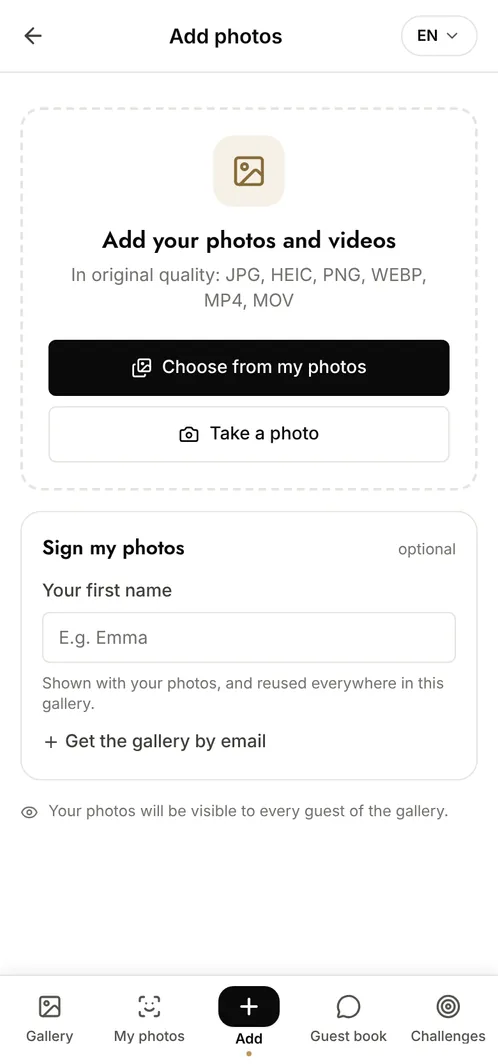
How do you collect photos from a student party?
Display a QR code at the entrance, on the bar and near the dance floor. Attendees scan it with their phone camera and add their photos during the night, with no app to install and no account to create, which is the only way to get participation at that scale. Organisers moderate what appears, download the full set afterwards, and get a ready-made album for next year's promotion.
The moments that make the album
The doors opening
The queue, the first arrivals, the room still empty: the photos that show how the night started.
The dance floor
The core of the evening, shot from inside the crowd by people the official photographer cannot replace.
The end of the night
The group photos at closing time, which are always the ones people ask for the next day.
Photo challenge ideas
The best group photo
Attendees compete for the shot with the most people in frame.
The outfit of the night
Everyone photographs the best look they see, and the room votes.
One photo per hour
The evening reconstructed as a timeline rather than a single pile of images.
Which plan for your student party?
A student party goes well beyond the free plan's 10 contributors and 100 photos within the first hour. The Event plan at €69 (one-off payment) gives unlimited photos and contributors and 6 months of retention. If the association wants the gallery under its own branding, Event Pro at €199 adds full white-label.
Free
€0
- 100 photos, 10 contributors
- Gallery online for 15 days
- For a big crowd
Event
€69one-off
- Unlimited photos and contributors
- Selfie search
- Challenges and guestbook
- Gallery online for 6 months
Frequently asked questions
Can organisers control what gets published?
Yes. With moderation switched on, every upload waits for approval before it becomes visible, so nothing appears in the gallery without an organiser seeing it first.
Can someone ask for their photo to be removed?
Yes. Organisers can delete any photo at any time, and a person appearing in a photo can request its removal. Facial recognition data, if used, is deletable on request.
Can the association put its own branding on the gallery?
Yes, from the Event Pro plan onwards: logo, colours and a custom watermark, so the gallery carries the association's identity rather than Evokly's.
How many people can upload at the same time?
There is no contributor limit from the Event plan onwards, and uploads run in parallel from the browser, so a full room adding photos at once is the normal case rather than a problem.
Also worth reading

Guides:QR codes for events: the complete guideThe 4 secrets of an event that really landsCreate a shared photo gallery for your event
All event types